A first draft gives your ideas a place to begin. Editing helps you find the words that feel right.
Read it once more, simplify what you can, and leave room for your own voice.
AI Detector Chrome Extension
Detect AI-generated content directly from the websites you already use. Scan selected text or an entire page, humanize content, and review your detection history without switching to another tab.
AI DETECTION
AI insights.Right where you write.
Check text for AI signals with clear scores and sentence-level highlights.

Unfox
AI Detector & Humanizer0%
AIDetection result
Human writing patterns
Selected text analysisIn our computer culture today, perfect pictures and selfies are more and more important than ever.
Whether you’re updating a social profile or posting something special online, sometimes the lighting or angles just don’t feel right.
Check content directly where you find it. Unfox gives you two simple ways to start an AI detection check.
Select the text you want to check and scan it directly from the browser. This works well for articles, posts, comments, emails, and other online content.
Scan the current webpage when you want to review more of its visible content instead of checking individual passages one by one.
Check content in place
Two ways to start a scanGood ideas start with a draft.
A first draft gives your ideas a place to begin. Editing helps you find the words that feel right.
Read it once more, simplify what you can, and leave room for your own voice.
Check just the passage you choose.
Start an AI content check from the browser without changing your workflow.
Open Unfox from the floating window while browsing a supported webpage.
Select text and use the browser context menu to access Unfox quickly.
Open the extension from the browser toolbar whenever you need it.
Enable automatic detection and let Unfox check content as you browse supported websites. Choose the platforms you want Unfox to monitor and set the maximum detection attempts per page.
X, LinkedIn, Facebook, and Reddit.
YouTube, Medium, and Substack.
Gmail, Outlook, Amazon, and Google Reviews.
Kalshi, Polymarket, Zhihu, Toutiao, Baijiahao, WeChat, and Sohu.
Free users can make up to 100 detection checks per day. Subscribers get unlimited detection.
Automatic detection
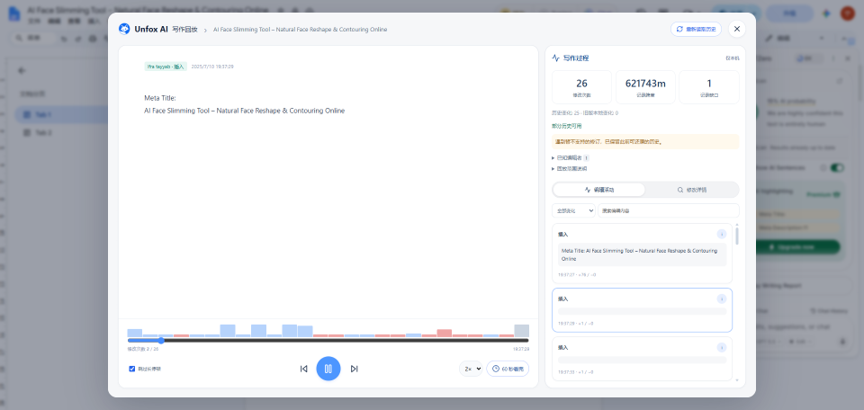
Your sites. Your preferences.Go beyond the final document. Unfox can replay Google Docs editing activity so you can review how a document changed over time.
Review the document's editing process instead of looking only at the final version.
Follow the editing history through a visual playback experience.
Detection is only one part of the workflow. After reviewing your result, you can use Unfox AI Humanizer to refine the text and check it again.
Analyze text for patterns associated with AI-generated writing.
Refine AI-assisted text to make it sound more natural and readable.
Run another detection check after editing to review the new result.
See the signals in your writing
Review a result before deciding what to edit.Clear writing makes an idea easier to understand.
Human 96%Sample resultGive your words a natural flow
Refine the wording while keeping your meaning.Clear communication is essential for facilitating effective collaboration.
Clear communication helps people work well together.
Pick up where you left off
Revisit the text and results from earlier checks.Unfox works alongside the websites and documents you already use, making AI content checks easier to fit into everyday work.
Check essays, assignments, and online content while researching or reviewing written work.
Review student writing and use Google Docs editing playback when document history matters.
Check drafts and AI-assisted writing before submitting or publishing content.
Review articles, posts, and submitted content directly from the webpages where you find them.
Check website copy, social posts, and other marketing content during content review.
Review online content and documents without repeatedly moving text between browser tabs.
Unfox keeps AI detection close to the content you are already reading, writing, and reviewing.
Select content or scan a page directly from your browser.
Use the floating window, right-click menu, or browser toolbar to open Unfox.
Move from AI detection to text humanization without leaving the extension workflow.
Explore more Unfox tools for checking AI-generated text, humanizing content, analyzing images, and understanding AI model usage.
Analyze text for patterns associated with AI-generated writing and get a probability-based detection result.
Check AI TextRefine AI-assisted text to make it sound more natural and readable.
Humanize AI TextAnalyze images for signals that may indicate AI generation.
Check an ImageCheck audio for patterns associated with AI-generated or synthetic speech.
Check a VoiceFind answers to common questions about the Unfox AI Chrome extension, AI detection, supported websites, Google Docs, automatic detection, and usage limits.
The Unfox AI Chrome extension lets you detect AI-generated content directly from your browser. You can scan selected text or an entire page, use automatic detection on supported websites, humanize text, and review detection history.
Open Unfox from the browser, select text or choose Scan Page, then review the AI detection result in the extension.
Yes. You can enable automatic detection and select supported websites where you want Unfox to check content while browsing.
Supported platforms include X, LinkedIn, Facebook, Reddit, YouTube, Medium, Substack, Gmail, Outlook, Amazon, Google Reviews, Zhihu, Toutiao, Baijiahao, WeChat, Sohu, Kalshi, and Polymarket.
Yes. Unfox provides Google Docs editing playback so you can review how a document changed over time.
Free users can make up to 100 detection checks per day. Subscribers get unlimited detection.
Yes. The extension includes an AI Humanizer that lets you refine AI-assisted text as part of the same workflow.
Yes. Choose Scan Page to check content from the current webpage.
No. AI detection results are estimates and can be wrong. Review the text, its context, and available editing history before drawing conclusions. A detection score alone is not proof of authorship.
Detect, humanize, and review content directly from your browser with Unfox AI.
100 free checks per day