
AI-generated images are becoming harder to identify by sight alone. A realistic portrait, product photo, landscape, or illustration may contain few of the obvious mistakes associated with earlier image generators.
AI image detectors take a different approach. They use machine learning models to analyze visual and statistical patterns within an image, then estimate whether those patterns are more consistent with AI-generated or human-created images.
The result is best treated as a useful detection signal rather than definitive proof of an image's origin.
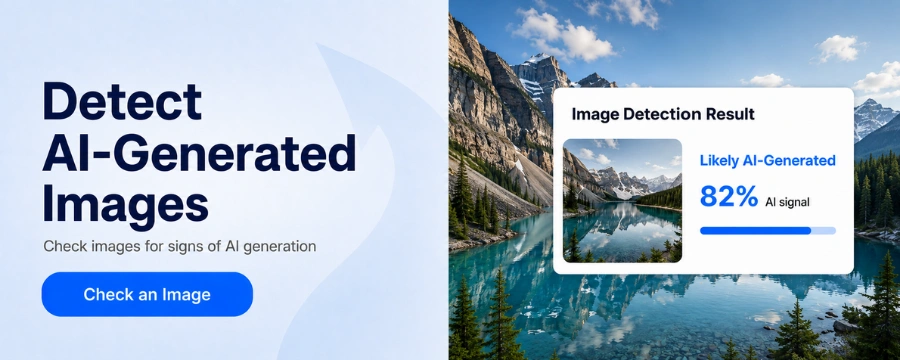
What Is an AI Image Detector?
An AI image detector is a tool designed to check if an image is AI-generated by analyzing characteristics within the image.
The detector extracts relevant features and uses a trained model to classify the image. Depending on the tool, the result may appear as a probability score, confidence level, or a label such as likely AI-generated or likely real.
This process goes beyond looking for obvious mistakes such as unusual hands or distorted text. Modern detectors can analyze patterns that may be difficult for people to recognize by sight alone.
How Do AI Image Detectors Work?
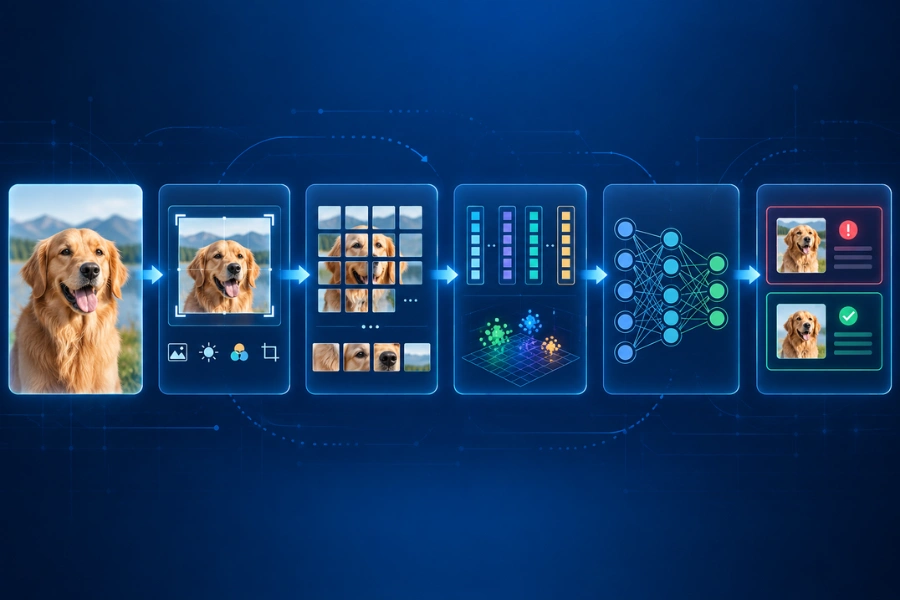
Different AI-generated image detectors use different models and detection methods. Their exact architectures can vary, but the general process can be understood through five steps.
Step 1 — The Detector Processes the Image
When you upload an image, the detector first prepares it for analysis.
Depending on the system, this may involve resizing the image, normalizing pixel values, or converting it into a format expected by the detection model.
Some modern computer vision systems use architectures such as Vision Transformers. A Vision Transformer can divide an image into smaller patches and convert them into numerical representations.
The model can then process relationships between these patches to build a representation of the image.
Step 2 — The Model Extracts Visual Features
Next, the model extracts features from the processed image.
In machine learning, a feature does not have to be something obvious like an extra finger or distorted face. Features can represent complex patterns involving texture, edges, shapes, spatial relationships, or other properties within the image.
Models can encode these characteristics as numerical representations, often called embeddings.
This allows the system to analyze relationships that would be difficult to capture with a simple checklist of visible AI mistakes.
Step 3 — The Detector Identifies Relevant Patterns
Once features have been extracted, the detector evaluates patterns that may help distinguish generated images from real ones.
Rather than relying on a single clue, a trained model can consider multiple relationships across the image. Some may be visually noticeable, while others may exist mainly as statistical patterns within the image data.
The exact signals depend on how the detector was designed and trained.
Step 4 — The Features Are Compared With Learned Patterns
A detector needs training examples to learn how different types of images behave.
During training, a classification model may be exposed to labeled examples of AI-generated and human-created images. From these examples, it learns patterns that help separate the two categories.
When a new image is uploaded, the detector evaluates its features based on what it learned during training.
Training data therefore matters. A detector trained extensively on images from certain generators may perform differently when it encounters output from a newer or previously unseen model.
Generative architectures also vary. GANs, diffusion models, and other image generation approaches do not necessarily produce identical image characteristics, which makes broad detection across different generators more challenging.
Step 5 — The Detector Produces a Classification or Score
Finally, the detector converts its analysis into a result that users can interpret.
This might be a label such as likely AI-generated, or a score representing how strongly the image matches patterns associated with the detector's AI-generated category.
The meaning of these scores can vary between tools. An 80 percent score from one detector should not automatically be interpreted in exactly the same way as an 80 percent score from another.
What Signals Do AI Image Detectors Look For?
There is no universal checklist used by every AI image checker. Different systems may use different combinations of engineered and automatically learned features.
| Signal | What It May Help Identify |
|---|---|
| Pixel patterns | Statistical differences within image data |
| Texture patterns | Unusual characteristics across surfaces and local regions |
| Frequency patterns | Subtle structures that may not be obvious visually |
| Lighting and shadows | Inconsistencies in physical or spatial relationships |
| Repeated structures | Unusual regularity or possible generation artifacts |
| Learned features | Complex patterns discovered during model training |
Some of these signals may correspond to things a person could notice. Others can involve numerical relationships that are not meaningful when viewed with the human eye.
This is why checking whether an image is real or AI involves more than looking for strange fingers, unrealistic faces, or unreadable background text.
Why Do Different AI Image Detectors Give Different Results?
You can upload the same image to two AI detectors and receive different classifications.
Results can depend on several factors:
- Training datasets
- Model architecture
- AI generators represented during training
- Image preprocessing
- Classification thresholds
- Scoring methods
- Model updates
For example, one detector might have extensive training data from several image generation models, while another was trained on a narrower collection. Their response to an unfamiliar AI-generated image may therefore differ.
Different tools may also set different thresholds for deciding when an image should be classified as AI-generated.
For this reason, disagreement between AI image detectors is possible, particularly with ambiguous, heavily edited, or unfamiliar images.
What Can Make AI Image Detection Harder?
AI image detection becomes more difficult when the image being analyzed differs substantially from the examples a detector learned from.
Image Compression
Compression changes pixel-level information and can remove subtle image details.
This may affect some of the patterns used during detection, although the impact depends on the image, detector, and level of compression.
Resizing and Cropping
Resizing changes pixel structure, while cropping removes part of the original visual information.
The detector therefore receives a different input even when the edited image still looks similar to a person.
Screenshots
Taking a screenshot creates a new version of the original image.
Changes in resolution, compression, scaling, or other processing can alter the underlying image data. This does not mean screenshots automatically bypass AI image detection, but they can affect the signals available for analysis.
Filters and Retouching
Sharpening, denoising, color adjustments, filters, and manual retouching can modify characteristics of the original image.
How much this affects detection can depend on the type and extent of the edits.
Mixed AI and Human Editing
Not every image fits neatly into an AI or human category.
A designer might generate a starting image with AI, replace the background manually, retouch individual objects, adjust colors, and add original design elements.
In these cases, the final image contains both generated and human-created elements. A single classification may not fully describe how the image was produced.
New Image Generators
Image generators continue to evolve.
A detector may have more difficulty identifying output from a model or generation technique that was not well represented in its training data.
How Accurate Are AI Image Detectors?
There is no single accuracy rate that applies to every AI image detector.
Performance can depend on the detector, evaluation dataset, image generator, image quality, editing history, and whether the images being tested resemble the data used during training.
Two types of errors are particularly important.
False positives happen when a human-created image is classified as AI-generated.
False negatives happen when an AI-generated image is classified as human-created or real.
These possibilities become especially important when detection results are used for journalism, education, moderation, or other decisions that could affect people.
For uncertain or high-stakes cases, a detection result is better used alongside other available evidence rather than as the sole basis for a conclusion.
AI Image Detection vs Metadata and Content Provenance
AI image detection is only one way to investigate how an image was created.
Metadata and content provenance can provide different types of information.
AI Image Detection
AI detection analyzes characteristics within the image and estimates whether they resemble learned patterns associated with AI generation.
It is an inference based on the image being analyzed.
Metadata
Image files can contain metadata related to the device, software, creation process, or editing history.
This information can provide useful context, but metadata may be removed or changed when an image is edited, compressed, downloaded, or shared through another platform.
Content Provenance
Content provenance approaches aim to preserve information about where digital content came from and how it has been modified.
Instead of inferring origin only from visual characteristics, provenance information can provide additional context about the content's history.
These approaches can complement one another. When one source of information is unavailable or inconclusive, another may provide useful evidence.
How to Use an AI Image Detector
If you want to check whether an image is AI-generated, the process is usually simple.
- Upload the image you want to analyze.
- Let the detector process and evaluate it.
- Review the classification or detection score.
- Consider the result alongside the image's context and any other available evidence.
For example, you can use Unfox AI to analyze an image when you want an additional signal about whether it may have been AI-generated.
For ambiguous or important cases, combining detection results with metadata, provenance information, source verification, or other available evidence can provide a more complete picture.
FAQ
Can AI detectors tell if an image is AI-generated?
AI image detectors can estimate whether an image contains patterns associated with AI-generated content.
False positives and false negatives can occur, so a classification should not automatically be treated as proof of origin.
How accurate are AI image detectors?
Accuracy varies across detectors and testing conditions.
Results can depend on training data, the image generator, image quality, editing, compression, and the dataset used to evaluate the detector.
Can AI detectors detect edited AI images?
In some cases, yes. However, editing can modify characteristics used during classification.
The result can depend on the type and extent of the editing as well as the detector itself.
Can screenshots fool AI image detectors?
Screenshots can alter underlying image data, but they do not guarantee that an AI-generated image will be classified as real.
Different detectors may respond differently depending on which signals remain after the screenshot is created.
Can AI image detectors detect DALL-E and other AI-generated images?
Some detectors may be trained using images from multiple generative models.
Performance can vary by generator, model version, image style, and detector. Strong performance on one type of AI-generated image does not necessarily mean the same detector will perform equally well on every generator.
Why do AI image detectors give different results?
Different tools can use different models, training datasets, preprocessing methods, thresholds, and scoring systems.
As a result, the same image may receive different classifications across detectors.
Is an AI detection score proof that an image was generated by AI?
No. A detection score represents how the detector classified the image based on the patterns it analyzes.
It is one useful signal rather than conclusive proof and can be considered alongside other available information when the image's origin matters.