
NoteGPT is an all-in-one AI learning and productivity platform for summarizing YouTube videos, analyzing PDFs, transcribing audio, creating study materials, and working with AI-generated content.
Its main advantage is breadth. A user can move from a long video or document to a summary, ask questions about the source, and create study materials without moving the information between several applications.
That breadth also creates a tradeoff. Not every feature has the same level of usefulness, and the platform's secondary tools require a different evaluation from its core summarization workflow.
Our verdict is that NoteGPT is worth considering if you regularly process long-form information and want several related AI tools in one place. If you only need one specialized function, a dedicated tool may offer more depth.
NoteGPT at a Glance
| Category | Assessment |
|---|---|
| Best for | Learning, research, and information processing |
| Main strength | Combining several related AI workflows |
| Strongest areas | YouTube and document summarization |
| Study tools | Flashcards, quizzes, mind maps, and presentations |
| Main limitation | Feature quality varies across the platform |
| Free option | Yes |
| Paid plans | Pro, Unlimited, and Max |
| Best reason to use it | Reducing tool switching across learning tasks |
NoteGPT Review Scorecard
| Area | Assessment |
|---|---|
| YouTube summarization | Strong |
| PDF workflows | Strong |
| Study tools | Good |
| Workflow convenience | Strong |
| Humanizer | Mixed |
| AI Detector | Use with caution |
| Pricing clarity | Mixed |
| Overall value | Good for multi-purpose users |
This review combines current product information, published third-party testing, user feedback, and practical workflow analysis. Official information is used for features, pricing, quotas, and processing limits, while third-party benchmarks and user reviews are treated as additional evidence rather than definitive measures of overall product quality.
What Is NoteGPT?
NoteGPT is an AI learning platform built around turning long-form information into more manageable formats.
Its current tools cover YouTube videos, PDFs, audio, AI chat, summaries, notes, mind maps, flashcards, quizzes, presentations, translation, writing, and other AI-assisted tasks.
That makes it broader than a typical video summarizer or PDF chatbot.
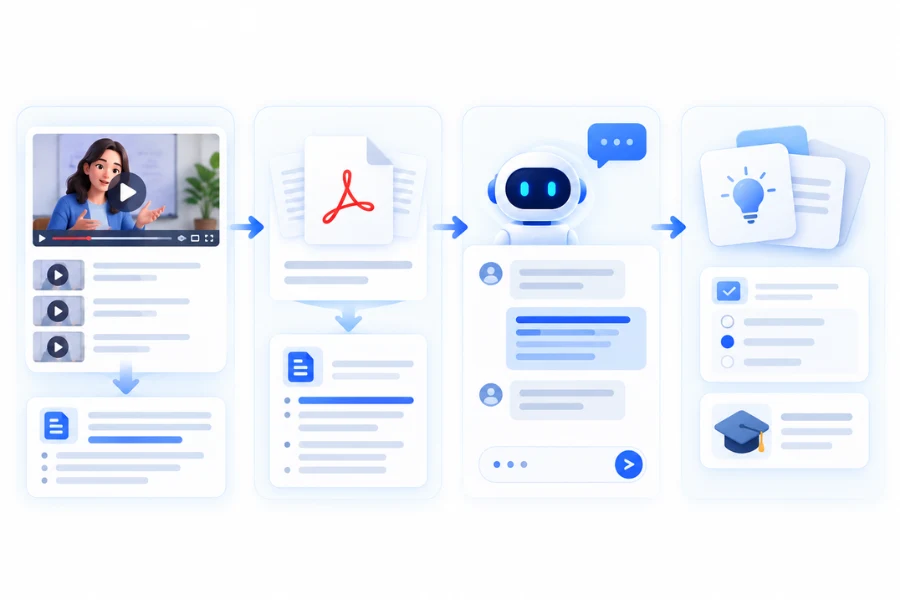
The more useful question is what happens when these features are used together. A student might start with a lecture, create a summary, ask questions about the material, and turn the same information into flashcards. A researcher might summarize a paper, ask document-specific questions, and organize important concepts.
That connected workflow is where NoteGPT has its strongest case.
How We Assessed NoteGPT
A platform with this many AI features cannot be judged by one successful summary or one detector score.
The assessment focuses on the parts that affect practical use
Output usefulness
Accuracy and context retention
Processing limits
Workflow efficiency
Study value
Pricing and quotas
User feedback
Performance of secondary tools
The evidence also needs to be separated by source. NoteGPT's own documentation is the appropriate source for current plan limits and feature availability. Independent benchmarks are more useful for comparative performance, while user reviews can reveal recurring experience issues but are not representative surveys.
This distinction is especially important for AI tools because performance can change with the source material, model, language, document structure, editing, and product version.
How Well Does NoteGPT Summarize YouTube Videos?
YouTube summarization is one of NoteGPT's clearest use cases.
The platform can process YouTube content and turn longer videos into structured information. That is useful for lectures, tutorials, interviews, educational channels, and research-oriented videos.
The practical value is not simply getting a shorter version of a video. A summary can help determine whether the video contains enough relevant information to justify watching it in full.
Transcript Quality
The transcript forms the input for much of the summarization workflow.
Clear speech and usable subtitles give the system a stronger source. Multiple speakers, accents, background noise, technical terminology, and missing subtitles can make transcription and summarization more difficult.
This is why the summary is better treated as a navigation layer than as a replacement for the source.
For technical, academic, or factual material, the original video still matters when an exact claim, number, quotation, or qualification affects the conclusion.
Summary Quality
A useful summary should identify the main argument, remove repetition, preserve important relationships between ideas, and avoid giving minor details too much weight.
That makes NoteGPT particularly useful for information triage. You can summarize a long lecture, identify relevant sections, and then return to the original source when a detail deserves closer attention.
The time saved comes from reducing unnecessary viewing, not from eliminating the need to verify important information.
Processing Limits
The amount of YouTube content you can process depends on the subscription plan.
NoteGPT currently lists batch processing for five YouTube videos on Pro, 10 on Unlimited, and 20 on Max. For videos without subtitles, the listed maximum is 120 minutes on Pro and 210 minutes on Unlimited and Max.
These limits matter differently depending on the user.
Someone summarizing one lecture occasionally may never encounter them. Someone processing an entire course or a large video library will care much more about batch size and maximum processing time.
Timestamps and Source Navigation
A summary becomes more useful when it helps you return to the original material.
If the generated notes identify an interesting concept, locating the relevant part of the video is more efficient than searching through the entire recording manually.
A practical workflow is therefore
Video → transcript → summary → relevant sections → source verification
That is a more meaningful way to evaluate a video summarizer than asking whether it can produce a readable paragraph.
How Well Does NoteGPT Handle PDFs and Documents?
PDF processing is another important part of the platform.
NoteGPT supports PDF summarization, document chat, OCR, translation, and related document functions. Its current documentation also separates basic document operations from features that consume premium credits.
This makes the platform relevant for research papers, reports, textbooks, lecture notes, and other long documents.
PDF Summarization
A long document summary can help establish relevance before committing to a full read.
For example, a researcher can summarize a paper, identify the methodology or conclusion, and then return to those sections rather than reading every page before deciding whether the paper is useful.
Document structure still matters.
Tables, technical terminology, references, footnotes, scanned pages, and complex layouts can create extraction or interpretation problems. A summary is therefore most useful as a navigation layer, while important findings should be checked against the source.
Chat With Documents
Document chat is more useful when the question is specific.
Instead of requesting another general summary, users can ask about a particular argument, section, concept, or piece of evidence.
This can reduce the time spent locating information in long documents, but it does not remove the need for source verification. An AI-generated answer can sound plausible even when it misses a qualification or interprets the document incorrectly.
For research and professional decisions, checking the relevant passage remains the safer workflow.
OCR and Scanned PDFs
OCR becomes useful when a PDF contains scanned pages that cannot be searched as normal text.
It can make these documents accessible to downstream AI tools, but extraction quality depends on the source image. Low-resolution scans, unusual fonts, tables, and complex layouts can still produce errors.
The practical benefit is improved access to difficult documents, not guaranteed perfect extraction.
NoteGPT for Studying and Research
NoteGPT becomes more useful when several tools operate on the same source.
A student could follow a workflow such as
Lecture → summary → questions → flashcards → quiz
A researcher could use
PDF → summary → document chat → notes
The advantage is not that every generated output will be perfect. It is that the same source can be transformed into several formats without repeatedly copying information between different applications.
Flashcards
Flashcards can turn passive reading into active review.
The main limitation is selection. Automatically generated cards may focus on minor facts or create questions that are technically correct but not especially useful for learning.
They work best as a first draft that the user can review and refine.
Quizzes
Quizzes can test whether you understand the source rather than simply recognize information from a summary.
Generated questions still need judgment. A poorly framed question can emphasize an unimportant detail or reinforce an incorrect interpretation, so quizzes are better treated as study aids than authoritative assessments.
Mind Maps
Mind maps can help when a subject contains clear relationships between concepts.
They are less useful when the source depends on detailed qualifications or when the information does not naturally form a hierarchy.
The value comes from making relationships easier to see, not from turning every document into a visual diagram.
Presentations
NoteGPT also includes presentation-related tools.
These can accelerate the creation of a first slide draft from existing material. Human editing is still needed for emphasis, sequencing, visual hierarchy, and factual review.
Can NoteGPT Replace Several AI Tools?
This is one of the strongest arguments for using NoteGPT.
A typical learning workflow might otherwise require a YouTube transcript tool, a summarizer, a note-taking application, and a separate flashcard or quiz service.
NoteGPT can combine several of those steps.
For example
YouTube → summary → AI chat → flashcards
Or
PDF → summary → document chat → study materials
This can reduce tool switching when the workflow stays within NoteGPT's supported learning features.
It does not mean the platform replaces every specialist tool. A dedicated research platform may provide stronger citation management, while a specialist writing tool may provide more control over rewriting.
The distinction is important because NoteGPT's main advantage is breadth and workflow convenience, rather than best-in-class performance in every individual category.
How Good Is NoteGPT's AI Humanizer?
The AI Humanizer needs to be evaluated separately from the platform's core learning tools.
It is designed to rewrite AI-generated text and provides controls related to tone, length, similarity, and output style.
Two separate questions matter here
Does the rewrite read well?
How does the rewritten text perform against AI detectors?
These measurements should not be treated as interchangeable.
Writing Quality and Detector Performance Are Different
A readable rewrite is not automatically a successful humanization.
HumanizerBench's July 2026 benchmark ranked NoteGPT 13th out of 13 tested tools with an overall score of 44.04 out of 100. Its readability score was 74.5, which ranked second in that cycle, while its median detector bypass rate was 0%. Its meaning score was 69.1.
The detector results varied considerably by service.
HumanizerBench reported average human-likelihood scores of 64.6 for ZeroGPT, 0.2 for Winston AI, 0.1 for Originality.ai, and 0 for both GPTZero and Copyleaks.
The results show why writing quality and detector performance need to be evaluated separately. NoteGPT's output could score reasonably well for readability while still receiving strongly AI-like scores from several detectors.
How Much Weight Should You Give the Benchmark?
The latest completed HumanizerBench ranking for NoteGPT is from July 2026.
HumanizerBench is useful as a comparative signal, but it should not be treated as a universal measure of human writing quality or detector reliability. Its July cycle used 33 prompts across seven writing categories and five detectors.
Detector results can change with the input text, model, language, length, editing, and detector version.
For users who mainly want more readable AI-assisted writing, the Humanizer may still have some value. For users choosing a tool primarily around AI detector performance, the available third-party evidence is considerably less favorable.
How Reliable Is NoteGPT's AI Detector?
AI detection should be treated as a screening signal rather than conclusive proof of authorship.
Human-written text can receive an AI-like score, while AI-assisted text can sometimes receive a human-like score. Formal writing, short passages, editing, language, and the detector itself can influence the result.
A NoteGPT detector score should therefore not be used by itself to decide whether someone wrote a piece of content.
This limitation applies broadly to AI detection rather than only to NoteGPT.
NoteGPT Pricing and Quotas
NoteGPT's current pricing structure uses both Basic Quotas and Premium Credits.
The distinction matters because a plan with unlimited Basic Quotas can still have a monthly Premium Credit allowance.
| Plan | Monthly billing | Annual effective price | Basic usage | Premium Credits | Best for |
|---|---|---|---|---|---|
| Free | $0 | — | Limited | Limited | Occasional users |
| Pro | $9.99 | $9/mo | 1,000 Basic Quotas | 100 | Regular students and users |
| Unlimited | $29 | $19.92/mo | Unlimited Basic Quotas | 2,800 | Heavy learners |
| Max | $99 | $69/mo | Unlimited Basic Quotas | 10,000 | Heavy multimedia users |
Prices and limits can change, so the official pricing page is the better reference before subscribing.
Free Plan
The free plan is useful for occasional users who want to test the platform or process a limited amount of content.
It is less suitable for workflows that involve frequent document processing, large video collections, or repeated premium features.
Pro
Pro is the entry-level paid option for regular users.
The 1,000 Basic Quotas and 100 Premium Credits provide substantially more capacity than the free tier, making it more appropriate for students or users who work with the platform regularly.
Unlimited
Unlimited is designed for users who need more Basic Quota capacity.
The important qualification is that the 2,800 Premium Credit allowance still applies. The plan therefore removes one usage constraint without making every premium feature unlimited.
Max
Max raises the Premium Credit allowance to 10,000 and provides higher limits for several processing-intensive features.
That makes it more relevant to heavy multimedia users than to someone who occasionally summarizes a lecture or document.
What Users Say About NoteGPT
User feedback provides useful experience signals, but review platforms are self-selected.
Trustpilot currently shows a 1.5 out of 5 TrustScore from 34 reviews, with recent comments covering both positive experiences with YouTube summarization and concerns about pricing, quotas, access expectations, and secondary features.
Some users specifically praise fast transcription and YouTube summarization, while others criticize limitations around features such as presentations or Humanizer performance.
The sample is small and self-selected, so the Trustpilot score should not be treated as a representative measure of overall product quality.
The more useful takeaway is the recurring pattern. Core summarization receives positive feedback, while pricing, quotas, and expectations around broader features generate more disagreement.
Where NoteGPT Falls Short
NoteGPT's limitations become clearer when the individual tools are evaluated rather than counted.
It Is Not a Specialist in Every Category
The platform covers a large range of AI tasks, but broad coverage does not guarantee specialist-level depth.
Its strongest case is the connected learning workflow rather than any single advanced function.
AI Summaries Still Need Verification
A summary can save substantial time while still omitting a qualification or misinterpreting a technical detail.
The higher the consequence of an error, the more important source verification becomes.
Usage Limits Can Affect Heavy Workflows
The distinction between Basic Quotas and Premium Credits matters more as usage increases.
Heavy users should estimate their actual workload before choosing a plan rather than relying on the "Unlimited" label alone. (notegpt.io)
Humanizer and Detector Results Need Caution
Third-party testing suggests that readable Humanizer output does not necessarily translate into strong detector performance.
AI detection itself is also probabilistic, so neither a Humanizer benchmark nor a detector score should be treated as definitive evidence of authorship.
NoteGPT Pros and Cons
Pros
Broad learning and productivity toolkit
Strong use cases for YouTube and document summarization
Several study formats available from the same source
Useful workflow between summaries, chat, and study materials
Free access makes initial testing easier
Cons
Feature depth varies across the platform
Quota and credit systems require attention
Heavy users need to understand processing limits
Humanizer performance is less convincing in third-party testing
AI detection should not be treated as conclusive
Who Is NoteGPT Best For?
Students
Students can use NoteGPT to process lectures, textbooks, PDFs, and other long-form learning materials.
The combination of summaries, flashcards, quizzes, and mind maps is most useful when the goal is to turn source material into active review.
Researchers
Researchers can use the platform to scan long documents, identify relevant sections, and ask focused questions.
It works best as a research assistant rather than a substitute for reading source material. Important findings, quotations, and methodological details still deserve direct verification.
Content Creators
Creators who regularly research YouTube videos, transcripts, and long-form material may benefit from having several related tools in one platform.
The value is greatest when information gathering and organization take significant time.
Professionals
Professionals dealing with reports, training materials, presentations, and long documents can also use NoteGPT to reduce repetitive information-processing work.
The tool can accelerate the first pass while professional judgment remains necessary for decisions that depend on accuracy or context.
Who Should Consider an Alternative?
NoteGPT becomes less compelling when you only need one highly specialized function.
A dedicated academic research platform may be better if citation management and research organization are your primary requirements.
A specialized video tool may be preferable if your workflow depends on advanced video-specific features.
A dedicated writing tool may make more sense if your main requirement is rewriting or refining AI-assisted text.
For users who primarily want to check or improve AI-assisted writing, a specialized tool such as Unfox AI may be a better fit than choosing a broad learning platform for that single task.
The better choice depends on the job you need the software to perform, not simply the number of features listed on its homepage.
Is NoteGPT Worth It?
NoteGPT is worth considering if you regularly process different types of long-form information and want to handle several related tasks in one place.
Its strongest value comes from the combination of YouTube summarization, document processing, AI chat, and study tools.
The platform is less compelling when you only need one specialized capability and want the deepest possible feature set in that category.
Pricing should also be evaluated against actual usage. Pro, Unlimited, and Max differ in quota volume, Premium Credits, and processing capacity, so the most expensive plan is not automatically the best choice for every heavy user.
Final Verdict
NoteGPT works best as an all-in-one learning and summarization platform.
Its strongest areas are YouTube and document workflows, where summarization, source chat, and study tools can reduce repetitive information-processing work.
Its broader feature set is both an advantage and a limitation. You get many tools in one place, but that does not mean every feature will match a specialized competitor.
The Humanizer illustrates the difference. HumanizerBench found relatively strong readability alongside weak detector performance in its July 2026 cycle. That does not make the feature useless, but it shows why writing quality and detector performance should be evaluated separately.
Overall, NoteGPT makes the most sense for students, researchers, and professionals who value a broad learning workflow. If you only need one specialized AI function, comparing dedicated alternatives may produce a better fit.
FAQ
Is NoteGPT worth using?
NoteGPT can be useful for students, researchers, and professionals who regularly process YouTube videos, PDFs, and other long-form information. Its main advantage is combining several related learning tools in one platform rather than requiring a separate service for every task.
Is NoteGPT free?
Yes. NoteGPT offers a free plan with limited usage. Paid plans increase Basic Quota and Premium Credit allowances and provide higher processing limits. The exact limits depend on the current plan.
Is NoteGPT good for YouTube summaries?
YouTube summarization is one of NoteGPT's strongest use cases. It can help users understand long videos quickly and identify sections worth watching. Important technical or factual information should still be checked against the original source.
Does NoteGPT work without subtitles?
Yes. NoteGPT currently lists support for YouTube videos without subtitles, with different processing limits by plan. Pro lists a maximum of 120 minutes for videos without subtitles, while Unlimited and Max list a maximum of 210 minutes.
Can NoteGPT summarize PDFs accurately?
NoteGPT can summarize PDFs and let users interact with documents through AI chat. Results can vary with document structure, technical complexity, extraction quality, and source content, so important details should be verified against the original document.
Is NoteGPT AI Humanizer effective?
The Humanizer can produce readable rewritten text, but third-party benchmark results raise concerns about its detector performance. HumanizerBench ranked NoteGPT 13th out of 13 in its July 2026 cycle with a 0% median detector bypass rate.
Can NoteGPT detect AI-generated text reliably?
AI detection should be treated as a probabilistic screening method rather than conclusive proof. Results can vary with the detector, text length, language, writing style, model, and editing.
What is NoteGPT best used for?
NoteGPT is best suited to users who need to process and transform information across several formats. YouTube summaries, PDF analysis, document chat, notes, flashcards, quizzes, and mind maps are particularly relevant for learning and research workflows.
Is NoteGPT better than a specialized AI tool?
It depends on the task. NoteGPT's advantage is breadth and workflow convenience, while specialized tools may provide deeper functionality for one specific job. The better option depends on whether you value an integrated workflow or specialized performance.